Get Started
The SANPO robot integration board connects a PC or host controller to CAN and RS485 joint motors. It supports USB, SPI, UART, and Linux SocketCAN, and also provides offline execution, I2C/ADC/UART expansion, and firmware development options.
This document applies to the Standard, CAN-isolated, and RS485-isolated boards based on STM32F407 and shipped with V4 firmware. For the STM32G473 FDCAN upgraded board, see the V6 documentation.
On This Page
Product Overview
The board contains two STM32F407 MCUs and can connect to multiple CAN and RS485 motors at the same time. A PC can connect through USB serial or SocketCAN. A Jetson, Raspberry Pi, or another host controller can connect through SPI.
Item |
Specification |
|---|---|
Processor |
2 × STM32F407 |
Host interfaces |
USB / SPI / UART / SocketCAN |
Motor interfaces |
4 independent CAN + 4 independent RS485 |
Motor-system power |
0 V to 58 V |
Control-system power |
USB, 5 V terminal, or host 5 V GPIO |
Power outputs |
0 V to 58 V / 3.3 V |
Transient protection |
1.5 kW peak, 93 V clamp voltage |
Power and motor connectors |
1 XT60 power input; 8 independent XT30 motor connectors |
Expansion and debug |
I2C / ADC / UART / SWD |
The board is suitable for joint-motor debugging, mixed CAN/RS485 control, and product prototyping. It also provides protection for voltage transients that may occur during motor startup, emergency stop, or direction changes.
Separate Motor and Control Power
The XT60 connector supplies the 0 V to 58 V motor system. The control system can be powered through USB, the 5 V terminal, or a host 5 V GPIO. Separating motor and control power reduces the effect of motor startup, emergency stop, and direction changes on the controller. The CAN-isolated and RS485-isolated versions also use isolated transceivers to reduce interaction between bus signals.
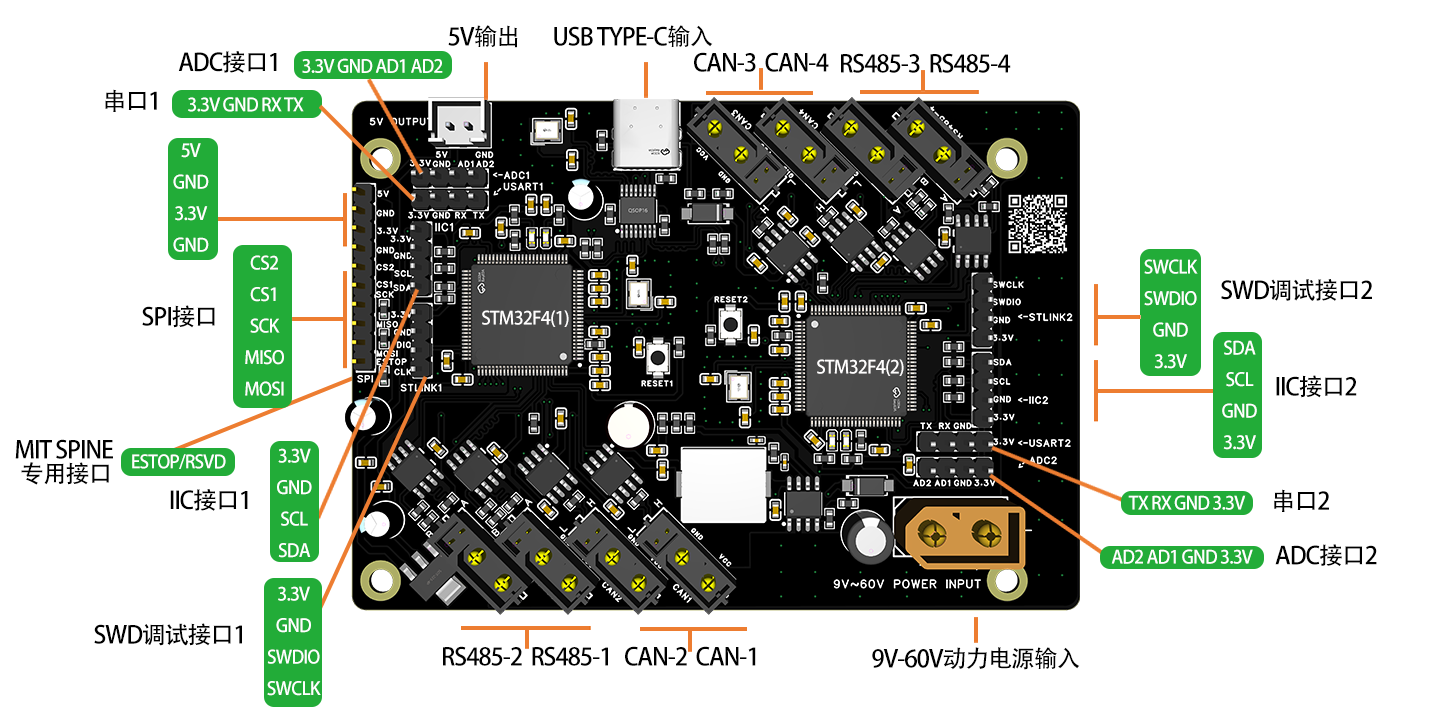
Board Connectors
Always follow the silkscreen and connector labels on your board. For the full circuit and MCU pin definitions, see Board Schematic and Pinout.
Protocols
Choose the page that matches your host and motor interface:
Use case |
Documentation |
|---|---|
Control CAN devices from Linux through |
|
Send raw RS485 data directly; leave at least 3 ms of idle time between commands, or use the SANPO protocol for continuous high-rate control |
|
Control a selected CAN channel through USB serial |
|
Control a selected RS485 channel at a high real-time update rate through USB serial |
|
Control CAN from a Jetson, Raspberry Pi, or another host through SPI |
|
Control RS485 from a Jetson, Raspberry Pi, or another host through SPI |
Debugging Tools
Choose a tool that matches the motor and connection method:
SANPO joint-motor tool for common standard motors: Sanpo Studio Motor Tools
CAN tools: Linux
can-utils, Windows CANgaroo, and similar applicationsXiaomi motor tool over USB to CAN: CyberGear Tool
Unitree motor tool over USB to RS485: Unitree GOM8010 Tool
Offline Execution
The board can store a list of commands and execute them at a configured interval without continuous commands from a PC. See Offline Batch Execution for the commands and test procedure.
Firmware Development
Choose one of the following approaches:
Approach |
Best for |
|---|---|
Keep the factory USB, SocketCAN, SPI, CAN, and RS485 functions while adding sensors, I2C, ADC, UART devices, or application logic in STM32CubeIDE or Keil |
|
Start from a Keil CAN standard-frame, CAN extended-frame, or RS485 example and implement your own communication and device-control logic |
If you only need to add I2C, ADC, UART devices, or custom commands, start with the SANPO firmware development framework. Choose a custom firmware example only when you need full control over the CAN/RS485 protocol and application structure.
See Firmware Update for programming instructions. The two STM32 devices have separate SWD connectors and must be programmed separately. The same firmware can be used on both MCUs when they perform the same function.
Important: Do not perform a full-chip erase. Flash Sector 7 stores factory initialization data. If it is erased, factory initialization must be performed again.
USB Example (PC / Host Debugging)
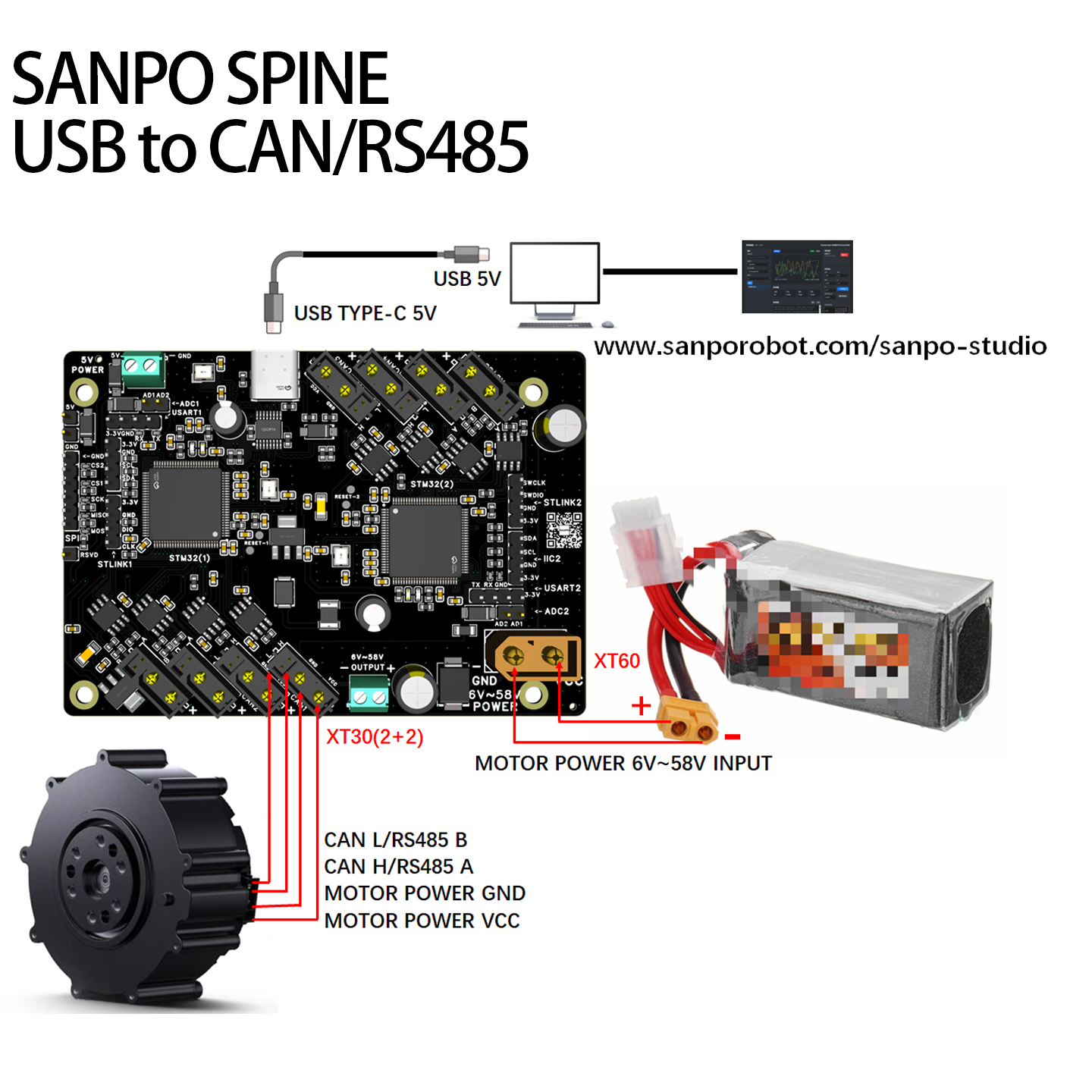
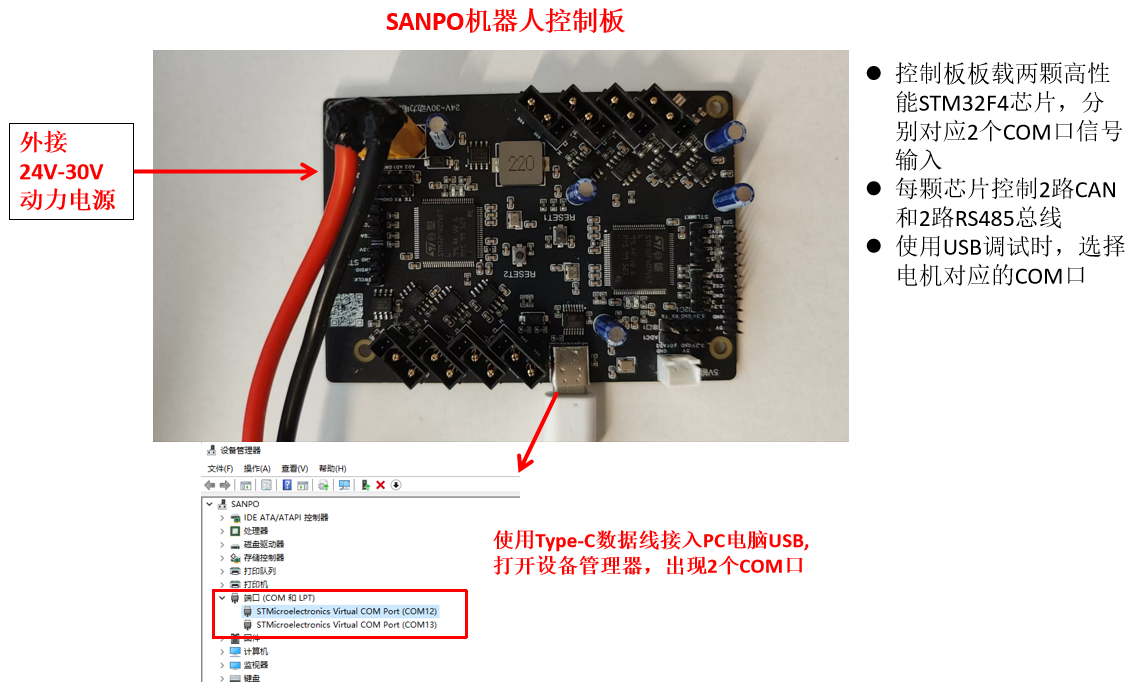
USB is suitable for PC debugging, online control, and feature validation. After wiring the board, use SANPO Studio, a tool supplied by the motor manufacturer, or your own host application to control CAN or RS485 motors.
On Windows, use SANPO Studio, a motor tool, or your own application.
On Linux, use USB serial. Firmware V4.6 and later also supports SocketCAN through
canXinterfaces.Connect the motor to CAN or RS485 according to its protocol.
SPI Example (Jetson, Raspberry Pi, and Other Hosts)
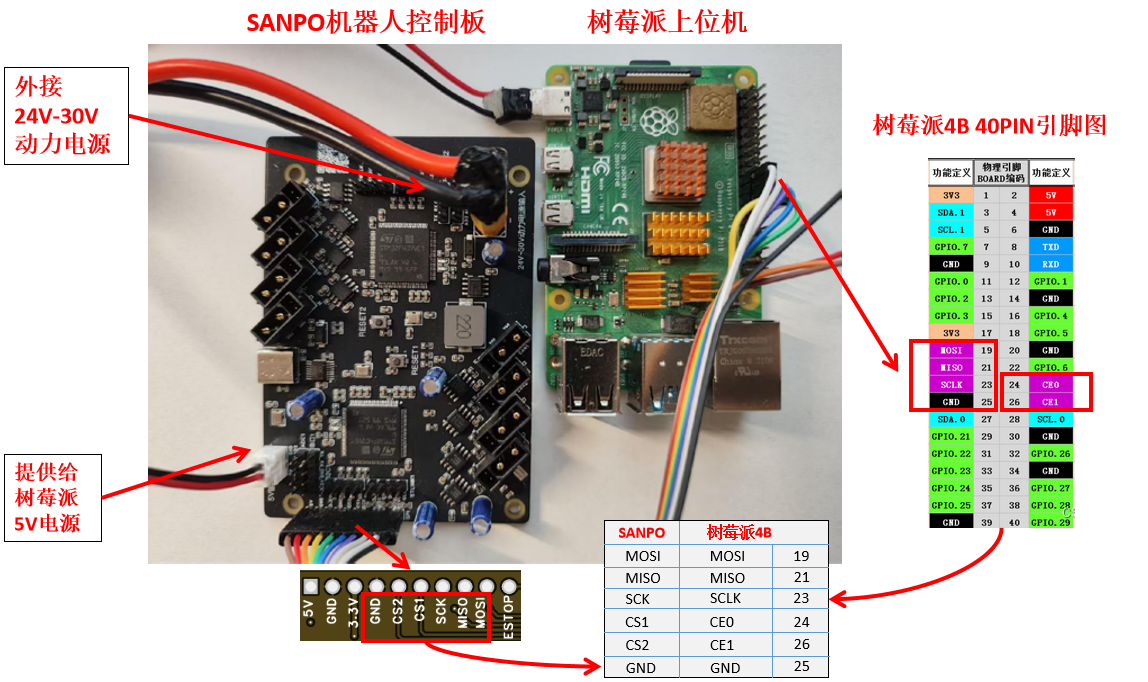
SPI is suitable for real-time communication between the board and a Jetson Nano, Raspberry Pi, or another host controller.
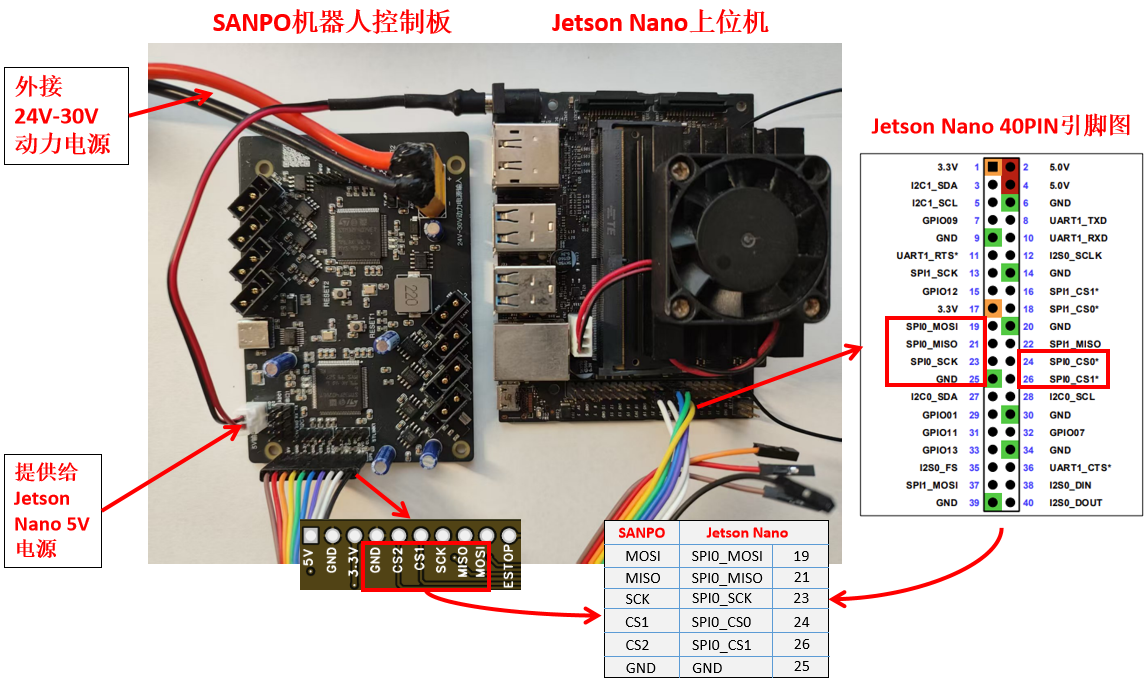
On Linux hosts, software CS0 and CS1 normally connect to the board connectors marked CS1 and CS2. CS1 accesses STM32 MCU (1), and CS2 accesses STM32 MCU (2).
Jetson Nano and Raspberry Pi are examples only. Other hosts can use the same SPI signals.
Connect the motor through CAN or RS485 according to its protocol.
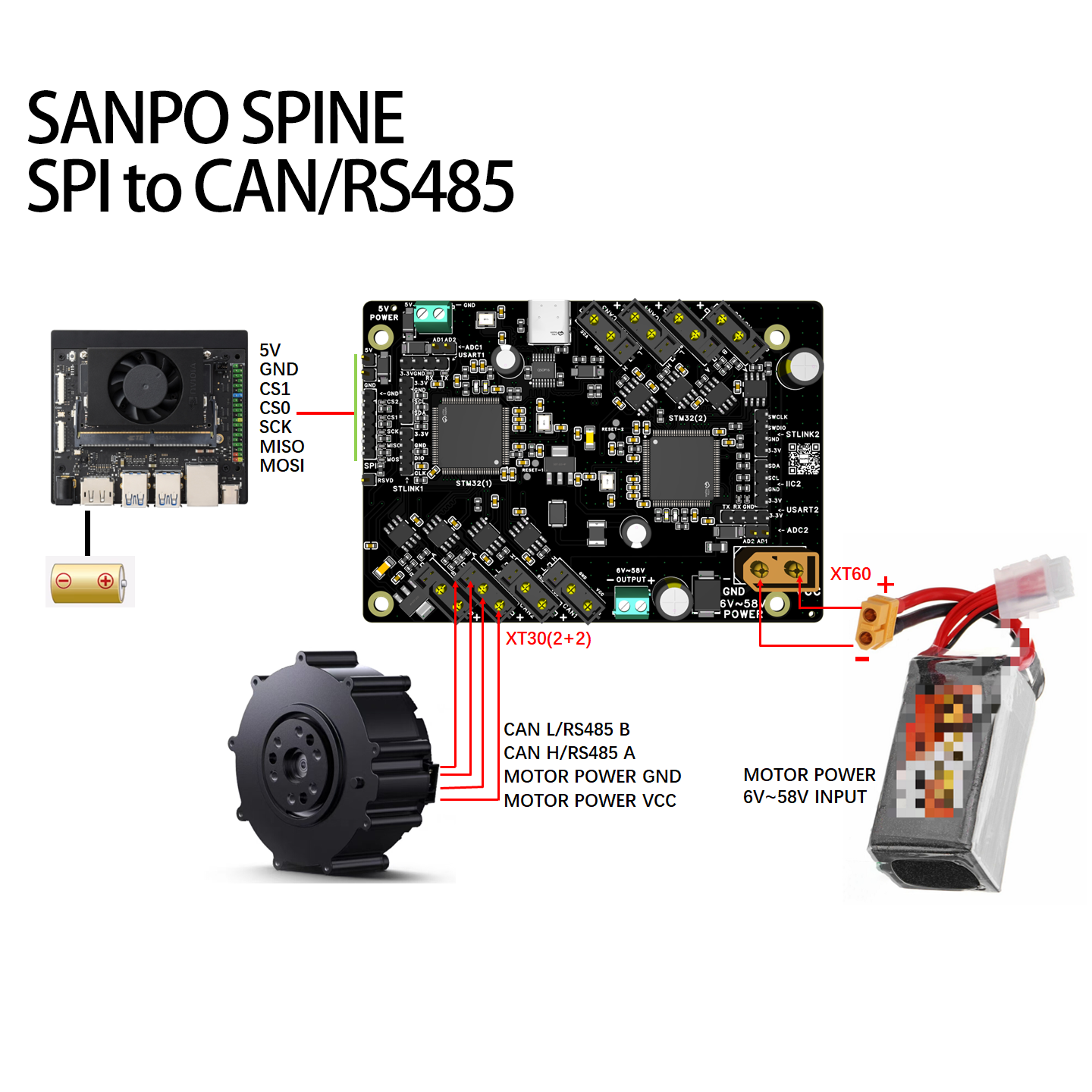
Jetson Nano Wiring
Raspberry Pi Wiring